Quick Start
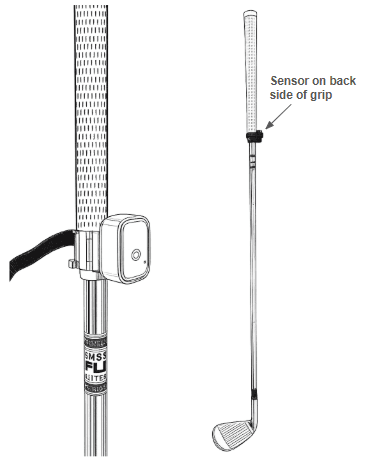
- Clip the sensor on to the bottom part of the grip (not on the shaft). Make sure it is snug and on the back side of your grip (where it is least visible).
- Wrap the velcro all the way around the sensor and grip. This is required for safety to prevent flying sensors.
- Open the Dryve Golf app on your phone.
- Press “Connect Sensor” to connect to your Bluetooth sensor. In the future, the app will connect on its own and the sensor will wake on its own.
- Press “Start Session” (and select the club you're using if needed).
- View your results on the phone, on an Apple Watch and view your swings over time on the History page.
Troubleshooting
Press the button in the middle of the sensor and you should see a flashing green light (if you don't, charge the sensor). If the sensor shows as “unavailable”, the owner of that sensor will have to go to Settings → Unattach Sensor before you can attach the sensor to your membership. If that doesn’t work, contact us at help@dryvegolf.com.
Double check that the sensor is connected, within 30 feet of your phone and you've pressed the green 'Start Session' button on the app. Also, make sure you pause at address so the app knows when your swing has started. If that doesn't work, contact us at help@dryvegolf.com.
A few things might help: (1) make sure your club lengths are accurate (press the name of the club on the main screen) (2) you can use the Speed Adjustment in Settings, (3) make sure you pause for maybe a second in between swings and (4) make sure the sensor is secure on your grip. If those things don’t work, contact us at help@dryvegolf.com.),
1) Try moving the sensor up on your grip so it’s snug (the sensor should be on the grip part, not the shaft itself). (2) Wrap the velcro around tightly. (3) Hopefully, it won’t come to this, but you can use a rubber band either around the sensor and/or below the clip. If you need to resort to (3), contact us at help@dryvegolf.com – we’d love the feedback!
You won't need to. The sensor comes with the latest firmware and pre-calibrated.
Yes, if you're offline, the app will store your swing data and upload it to the cloud later. You will need to have an internet connection for your very first login (but not subsequent logins).
Connect to the sensor. You can see the battery charge level on the lower left of the main app screen. Use any USB-C charger to charge it.